Overview
Develop a new feature for Google Maps focused on traveler flexibility & itinerary management
Timeline: 1 month
Role: UX/UI Designer
Tools: Figma/FigJam
Year: 2026
Background
While Google Maps supports multi-stop route planning, saving and revisiting those itineraries remains unintuitive, often forcing users to rely on workarounds such as screenshots, saved links, or external tools.
Problem
Frequent travelers need an easier way to save and revisit multi-stop routes because current workarounds are inconvenient and making trip planning unpleasant on Google Maps.
Solution
Saved Routes is a proposed Google Maps feature that allows users to save a multi-stop routes (3+ stops) and quickly retrieve them later for seamless trip planning and navigation.
The Problem & Opportunity
Although Google Maps supports multi-stop route planning, saving & revisiting those itineraries remains unintuitive, forcing users to rely on workarounds such as screenshots, saved links, or external tools.
EXTERNAL TOOLS
Extra apps to manage on top of Google Maps
SAVED LINKS
Easy to lose, hard to find later, reopen & navigate
SCREENSHOTS
Hard to organize, search, or follow later
User Research
Research Goals
• How are users currently using Google Maps?
• What are they trying to achieve?
• What are their biggest pain points?
Target Users
Frequent travelers & trip planners who rely on Google Maps to organize multi-stop itineraries and want a more seamless way to save, revisit, & adjust their routes.
Insights from Interviews
Primary usage for Google Maps across 6 interview participants:
Road trips
Travel
Daily driving
Public transit
Saved places
Daily exploration
Travel planning
Restaurants
Takeaways
While users trust the app for point-to-point directions, there is a frustration regarding the inability to “save” complex, multi-stop route.
Users want
Spontaneous discovery along route
Saved itineraries
Less re-planning
Route optimization

I affinity mapped the user interview findings into major themes, which surfaced these pain points & opportunities.
Pain Points
Inability to save multi-stop route: If a user exits the app or loses signal, the complex multi-stop route (3+ stops) they built often vanishes.
No reminders nearby when driving past saved places as they want local spots to resurface naturally.
Hidden saved content: Saved places or lists are buried too deep where users forget what they saved until it’s too late (i.e, driving past a city where user bookmarked a restaurant to try)
Opportunities
Multi-stop travel planning: save & revisit planned routes/trips
Organize saved locations more easily: many users save restaurants, landmarks, or recommendations but often forget about them later because they are buried inside folders or lists or hard to access while traveling
Make flexible changes to routes while navigating
Discover useful spots during travel
The most validated opportunity was a feature allowing users to save & revisit multi-stop routes directly within Google Maps.
User Persona
I developed a user persona to synthesize research insights and guide design decisions. Emma is an avid Google Maps user and organized trip planner who seeks a more seamless way to organize, save, and revisit her travel itineraries.

This persona represents frequent travelers who rely on planning ahead and need an easier way to save and revisit multi-stop itnieraries
The Design Solution
Design
Feature Set
I prioritized features into four categories to balance user needs with development feasibility and identify future product opportunities.
Must-have
Built-in save function for when user starts adding 2+ destinations on Google Maps
Nice to have
When user is in a location close to their saved places, popup reminder will show to notify user to check it out
Surprising & Delightful
Enable user to explore nearby places while still in navigation mode, without having to exit out of their current navigation
Can come later
Show the time/distance for each stop when user adds multiple stops for their route
Task Flow
To translate my user’s needs and goals into steps within my feature design, I mapped out my task flow:
Task 1 - Save a multi-stop route
Task 2 - Retrieve a saved route

Wireframes
I created key low-fidelity wireframes showing the main flow for saving a route while aligning with Google Maps’ existing navigation patterns and interface layout.
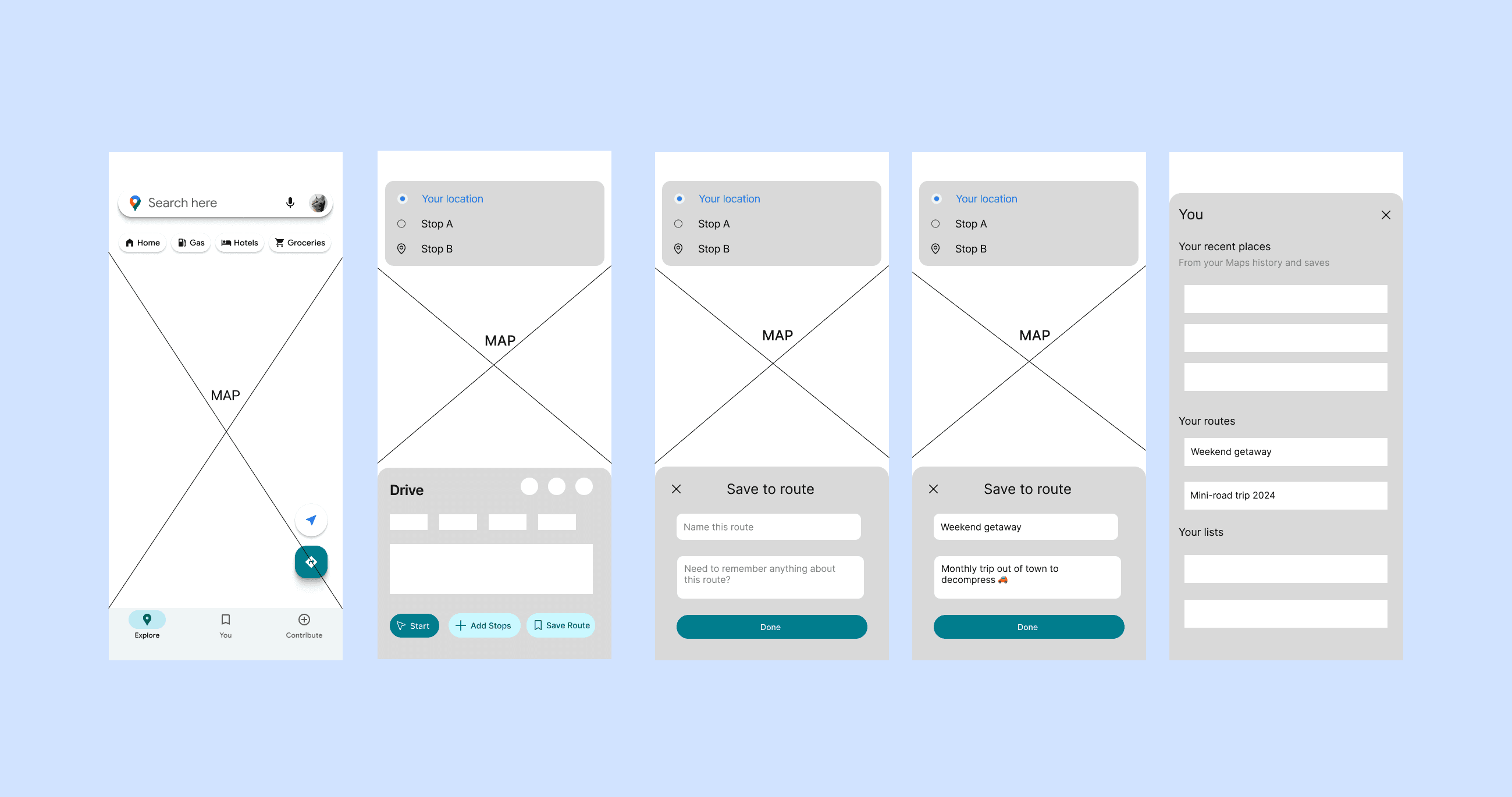
The design challenge here is to figure out where should the Save Route CTA live and how to add a feature without cluttering Google Maps’ UI.
I performed A/B testing to evaluate potential placement options for the new Save Route feature.

While participants were split between Option A and Option B, feedback consistently indicated that Option A provided the clearest and most intuitive path for saving a route.
Finally, I brought the wireframes to the highest fidelity with the prioritized key screens that represent the essential interactions the user will take.
Search
Add Stops
Preview Route
Save Route
Retrieve Route
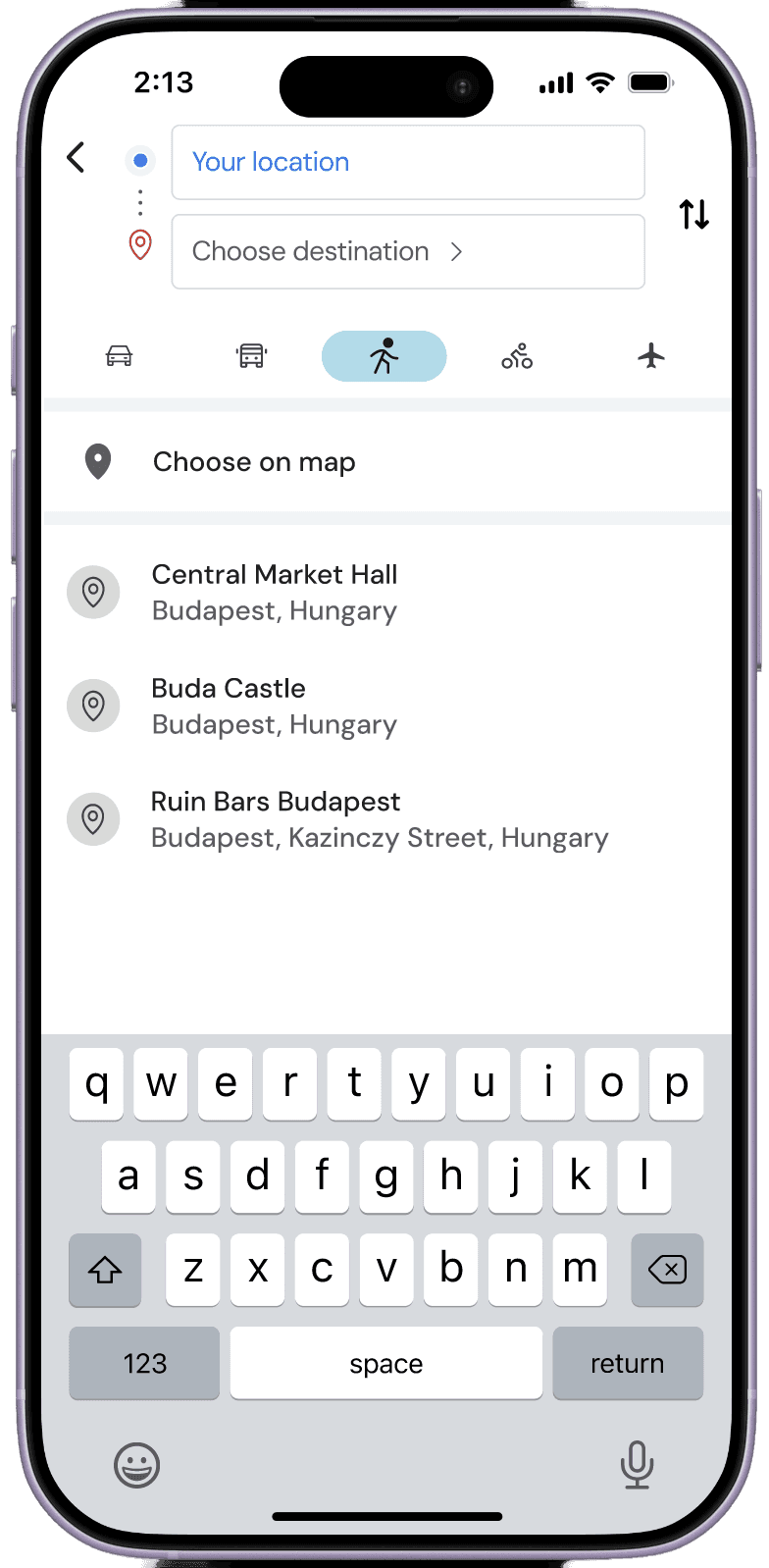
Search
User searches for their desired destination.

Add Stops
User adds multiple stops to build their route.
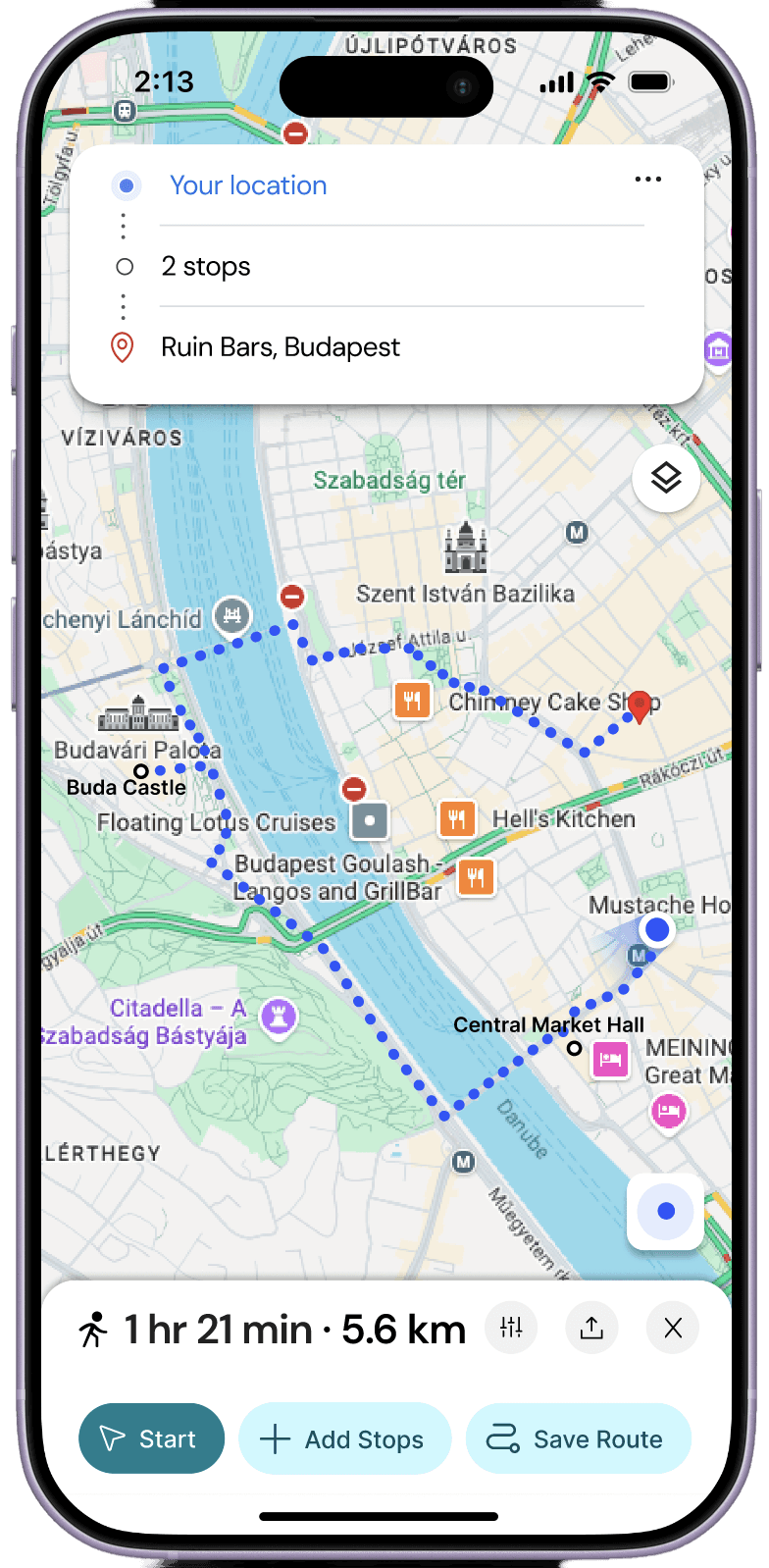
Preview Route
User reviews the complete multi-stop route before saving.
Save Route
User names and saves the route for easy access later.

Retrieve Route
User returns to their saved route and resumes navigation.

Testing
I conducted moderated usability testing with 5 participants using task-based scenarios to evaluate the core Saved Routes experiences, focusing on route creating, saving, and retrieval.
Task 1: Create and save a 3-stop route
Task 2: Retrieve a saved route
Key Findings
1
Route saving felt intuitive and easy to learn
Participants completed core tasks with minimal guidance.
2
Lack of action confirmation when saving a route
Users needed clearer confirmation after saving.
3
Missing “unsaved” state reduced clarity
Participants expected saved/unsaved states and an easy way to undo actions.
Most participants completed both tasks successfully, with ratings clustered around 1 to 2 out of 5 (1 = easiest). Every participant confirmed they would use this feature in real life.
Iterations
Based on the feedback received from the usability testing, the following improvements were made to the prototype:

Did it save?
Added Save Route confirmation state to the button after users done saving a route

How do I unsave the route?
Added unsave action by allowing users to click the saved button again to remove the route from their saved list

Made minor UI refinement in Saved screen based on user’s feedback, improving visual hierarchy between sections for better scannability
Reflection & Future Considerations
This add-a-feature project for Google Maps stemmed from a personal pain point I experienced while solo traveling in Europe, where I had to text the planned route links to myself the night before so I could easily access them the next morning.
One of the biggest challenges in this project was recruiting highly relevant participants. Because this feature primarily benefits avid travelers and users who frequently plan multi-stop trips, finding the right audience within the project timeline proved difficult.
As a result, many research and testing participants were general Google Maps users rather than frequent trip planners. This likely influenced the insights, as some participants did not regularly experience the route planning pain points the feature was designed to solve.
This project taught me that not every pain point is universal, even if it feels personally significant. It reinforced the importance of recruiting participants who closely match the target user group and reminded me to stay open-minded during research, allowing user insights to shape the problem space rather than seeking validation for my own assumptions.
Next Steps
Future iterations could focus on the other 3 feature sets and exploring advanced features such as route optimization. Given more time, I would focus on validating with more targeted users by conducting additional research with frequent travelers and road trippers to better validate product-market fit.
Can come later
Show the time/distance for each stop when user adds multiple stops for their route
Nice to have
When user is in a location close to their saved places, popup reminder will show to notify user to check it out
Surprising & Delightful
Enable user to explore nearby places while still in navigation mode, without having to exit out of their current navigation
This project strengthened my ability to design within an existing ecosystem while balancing user needs, product constraints, and feature prioritization to create solutions that feel intuitive and seamlessly integrated.
Other Work

Petit Duc Responsive Website Redesign

Simple Homebar